首页
产品
文档
博客
订单
文档
基于React开发前端
182 次浏览
2026年 6月 24日 上午11:09
在快速集成中,我们使用官方推荐的Electron Forge创建程序。可以用来开发react但是需要很多配置,我们在这个例子中换一个更简单的脚手架: [create-electron](https://www.npmjs.com/package/%40quick-start/create-electron) ## 1.创建项目 ```bash npm create @quick-start/electron ``` ```bash > npx > "create-electron" ✔ Project name: … electron-app-react ✔ Select a framework: › react ✔ Add TypeScript? … No / Yes ✔ Add Electron updater plugin? … No / Yes ✔ Enable Electron download mirror proxy? … No / Yes Scaffolding project in electron-app-react... Done. Now run: cd electron-app-react npm install npm run dev ``` 编辑器打开项目,可以看到目录结构如下 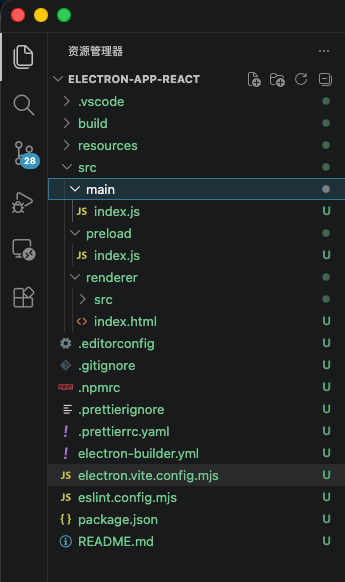 ## 2.安装扩展 执行命令 ```bash npm i nodeplayer-addon ``` ## 3.编辑 src/main/index.js 文件 ```js import { app, shell, BrowserWindow, ipcMain } from 'electron' import { join } from 'path' import { electronApp, optimizer, is } from '@electron-toolkit/utils' import icon from '../../resources/icon.png?asset' import NodePlayerAddon from 'nodeplayer-addon' function createWindow() { // Create the browser window. const mainWindow = new BrowserWindow({ width: 900, height: 670, show: false, autoHideMenuBar: true, ...(process.platform === 'linux' ? { icon } : {}), webPreferences: { preload: join(__dirname, '../preload/index.js'), sandbox: false } }) mainWindow.on('ready-to-show', () => { mainWindow.maximize(); mainWindow.show() }) mainWindow.webContents.setWindowOpenHandler((details) => { shell.openExternal(details.url) return { action: 'deny' } }) // HMR for renderer base on electron-vite cli. // Load the remote URL for development or the local html file for production. if (is.dev && process.env['ELECTRON_RENDERER_URL']) { mainWindow.loadURL(process.env['ELECTRON_RENDERER_URL']) } else { mainWindow.loadFile(join(__dirname, '../renderer/index.html')) } mainWindow.on('closed', () => { NodePlayerAddon.unregisterIpc(ipcMain) }) NodePlayerAddon.registerIpc(ipcMain, { getWindow: () => mainWindow, licensePath: app.isPackaged ? join(process.resourcesPath, 'license.dat') : join(__dirname, 'license.dat'), }) } // This method will be called when Electron has finished // initialization and is ready to create browser windows. // Some APIs can only be used after this event occurs. app.whenReady().then(() => { // Set app user model id for windows electronApp.setAppUserModelId('com.electron') // Default open or close DevTools by F12 in development // and ignore CommandOrControl + R in production. // see https://github.com/alex8088/electron-toolkit/tree/master/packages/utils app.on('browser-window-created', (_, window) => { optimizer.watchWindowShortcuts(window) }) // IPC test ipcMain.on('ping', () => console.log('pong')) createWindow() app.on('activate', function () { // On macOS it's common to re-create a window in the app when the // dock icon is clicked and there are no other windows open. if (BrowserWindow.getAllWindows().length === 0) createWindow() }) }) // Quit when all windows are closed, except on macOS. There, it's common // for applications and their menu bar to stay active until the user quits // explicitly with Cmd + Q. app.on('window-all-closed', () => { if (process.platform !== 'darwin') { app.quit() } }) // In this file you can include the rest of your app's specific main process // code. You can also put them in separate files and require them here. ``` ## 4. 编辑src/preload/index.js ```js import { contextBridge, ipcRenderer } from 'electron' contextBridge.exposeInMainWorld('electronAPI', { createPlayer: (id) => ipcRenderer.invoke('player:create', id), startPlayer: (id, url) => ipcRenderer.invoke('player:start', id, url), stopPlayer: (id) => ipcRenderer.invoke('player:stop', id), destroyPlayer: (id) => ipcRenderer.invoke('player:destroy', id), startRecord: (id, filePath) => ipcRenderer.invoke('player:startRecord', id, filePath), stopRecord: (id) => ipcRenderer.invoke('player:stopRecord', id), // 截图:将渲染进程生成的 JPG base64 数据保存到指定路径(默认由主进程自动生成) saveScreenshot: (id, outputPath, base64Data) => ipcRenderer.invoke('player:saveScreenshot', id, outputPath, base64Data), // 预探测:在创建播放器前分析 URL(连接性 / 编码 / 分辨率 / 首帧截图) getMediaInfo: (url) => ipcRenderer.invoke('player:getMediaInfo', url), onEvent: (id, callback) => { const channel = `player:event:${id}` const handler = (event, data) => callback(data) ipcRenderer.on(channel, handler) return () => ipcRenderer.removeListener(channel, handler) }, onInfo: (id, callback) => { const channel = `player:info:${id}` const handler = (event, info) => callback(info) ipcRenderer.on(channel, handler) return () => ipcRenderer.removeListener(channel, handler) }, onData: (id, callback) => { const channel = `player:data:${id}` const handler = (event, data) => callback(data) ipcRenderer.on(channel, handler) return () => ipcRenderer.removeListener(channel, handler) } }) ``` ## 5.编辑src/renderer/src/App.jsx ```js import { useRef, useEffect, useState, useCallback } from 'react' import NodePlayerView from 'nodeplayer-addon/NodePlayerView' function App() { const videoRef = useRef(null) const playerRef = useRef(null) const [url, setUrl] = useState('') const [status, setStatus] = useState('') const [recording, setRecording] = useState(false) useEffect(() => { const player = new NodePlayerView(videoRef.current, `player-${Date.now()}`) player.on('event', (code, msg) => { if (code === 3001) setRecording(true) if (code === 3002 || code === 3003) setRecording(false) }) player.on('error', (err) => { setStatus(err.message) }) playerRef.current = player return () => { player.stop() } }, []) const handleStart = useCallback(() => { playerRef.current?.start(url) }, [url]) const handleStop = useCallback(() => { playerRef.current?.stop() }, []) const handleRecord = useCallback(() => { const p = playerRef.current if (!p) return p.isRecording ? p.stopRecord() : p.startRecord() }, []) const handleScreenshot = useCallback(async () => { const p = playerRef.current if (!p) return const r = await p.saveScreenshot() setStatus(r.success ? '截图已保存:' + r.path : (r.error || '截图失败')) }, []) return ( <div style={{ maxWidth: 800, margin: '10px', fontFamily: 'sans-serif' }}> <div style={{ position: 'relative', width: '100%', aspectRatio: '16 / 9', background: '#000' }}> <video ref={videoRef} autoPlay muted playsInline style={{ width: '100%', height: '100%', display: 'block', objectFit: 'contain' }} /> {status && ( <div style={{ position: 'absolute', top: 8, left: 8, color: '#0f0', fontFamily: 'monospace', fontSize: 12 }} > {status} </div> )} </div> <div style={{ display: 'flex', gap: 8, padding: '10px 0' }}> <input type="text" value={url} onChange={(e) => setUrl(e.target.value)} placeholder="rtsp:// 或 http://" style={{ flex: 1, padding: '6px 10px', fontSize: 14 }} /> <button onClick={handleStart}>播放</button> <button onClick={handleStop}>停止</button> <button onClick={handleRecord}>{recording ? '停止录像' : '录像'}</button> <button onClick={handleScreenshot}>截图</button> </div> </div> ) } export default App ``` ## 运行效果 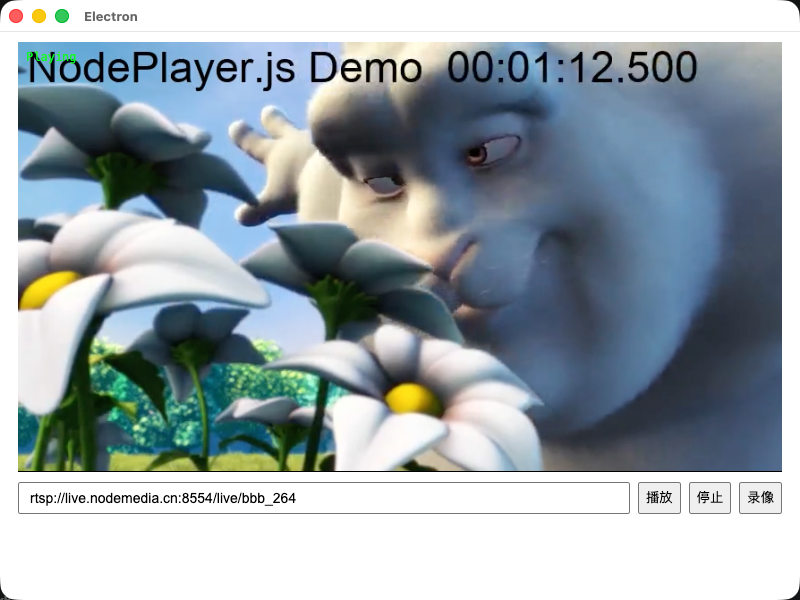 ## 加上样式后的运行效果 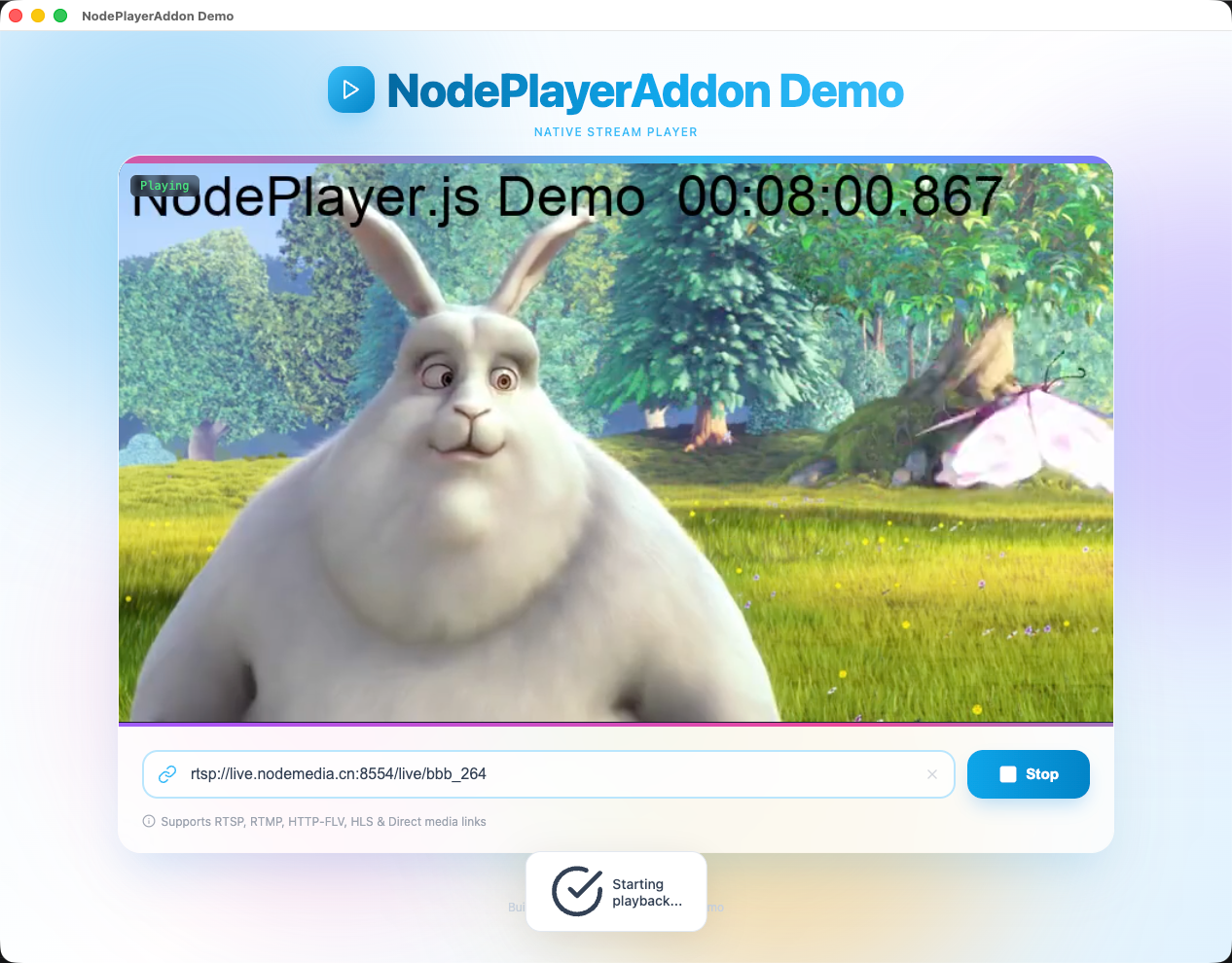 ## 6. 更多功能 上面的示例只演示了「播放 / 停止 / 录像 / 截图」。`registerIpc` 实际在主进程注册了更多能力,下面按需选用。 ### 事件码参考 播放器通过 `player.on('event', (code, msg) => {})` 推送事件,常用码如下: | 范围 | code | 含义 | |------|------|------| | 连接 | 1000 | 正在连接 | | | 1001 | 已连接 | | | 1002 | 连接失败 | | | 1003 | 重连中 | | | 1004 | 已断开 | | | 1005 | 网络错误 | | | 1006 | 连接超时 | | 录像 | 3001 | 录像开始 | | | 3002 | 录像停止 | | | 3003 | 录像错误 | > 流的编码、分辨率、采样率等参数通过 `player.on('info', (info) => {})` 单独推送,不走 `event`。 ### 流预探测(getMediaInfo) 在加入播放列表前,可先探测地址是否可达、获取音视频参数并截取首帧预览图。 👉 完整 API、codec 参考表与示例:[get-media-info.md](./get-media-info.md) ### 截图 `NodePlayerView` 提供两种截图方式,均在**流就绪后**调用: - `player.captureScreenshot(quality?)` → 返回 `data:image/jpeg;base64,...` 字符串(仅在内存中,不落盘) - `player.saveScreenshot(outputPath?, quality?)` → 通过 IPC 将 JPG 写入磁盘,返回 `{ success, path }`,路径省略时由主进程自动生成 ```js // 直接预览(不落盘) const dataUrl = player.captureScreenshot(0.9) if (dataUrl) snapshotImg.src = dataUrl // 保存到文件 const r = await player.saveScreenshot() if (r.success) console.log('已保存:', r.path) ``` ## 联系客服索取demo源码 - QQ: 281269007 - Email: service@nodemedia.cn
嘿,我是小R,需要帮助随时找我哦
QQ客服:281269007
飞书客服
邮件支持
扫码加微信
回到顶部