首页
产品
文档
博客
订单
文档
算法盒子接入
190 次浏览
2026年 5月 20日 下午3:36
## 简介 NodeMediaServer支持算法盒子推理后再编码推流,本例以算能设备举例 ## NMS配置 确保rtsp 的端口项设置 ```ini [rtsp] # port rtsp协议tcp端口, ffmpeg,vlc等播放器默认使用tcp传输协议,udp传输rtp媒体数据 # ffmpeg 使用 -rtsp_transport tcp 则rtsp协议和rtp数据都通过单一tcp端口传输 # vlc 使用命令行加参数设置tcp传输 /usr/bin/vlc --rtsp-tcp rtsp://localhost/live/2 # 使用tcp传输的好处是 1:单一网络端口开放, 2:公网传输不花屏 # 对应播放和推流地址规范与rtmp一样, 也支持鉴权参数 # rtsp://localhost/live/stream # rtsp://localhost/live/stream?sign=1671694080-64669b5d4b147ac09dc6ec42ef79815d # 支持h264/h265+aac/opus/g.711 编码 port = 8554 # RTP port , RTP通过UDP传输时,复用该端口, 该端口必须是偶数 rtp_port = 8002 # RTCP port, RTCP通过UDP传输时,复用该端口, 该端口比RTP_PORT大1 rtcp_port = 8003 ``` ## sophon-stream 配置 https://github.com/sophgo/sophon-stream 请确认版本更新到2025/04/01之后的版本,已提交兼容补丁 ### RTSP推流 ```json { "configure": { "encode_type": "RTSP", "rtsp_port": "8554", "rtmp_port": "1935", "ip":"192.168.2.222", "prefix":"sophon_", "wss_port": "9000", "enc_fmt": "h264_bm", "pix_fmt": "I420", "ws_enc_type": "IMG_ONLY", "fps": 25 }, "shared_object": "../../build/lib/libencode.so", "name": "encode", "side": "sophgo", "thread_number": 4 } ``` ### RTMP推流 ```json { "configure": { "encode_type": "RTMP", "rtsp_port": "8554", "rtmp_port": "1935", "ip":"192.168.2.222", "prefix":"sophon_", "wss_port": "9000", "enc_fmt": "h265_bm", "pix_fmt": "I420", "ws_enc_type": "IMG_ONLY", "fps": 25 }, "shared_object": "../../build/lib/libencode.so", "name": "encode", "side": "sophgo", "thread_number": 4 } ``` ### 编码兼容 RTMP、RTSP协议推流都支持h264/h265编码 如需要H265编码确保已设置 ``` "enc_fmt": "h265_bm", ``` ## 运行效果 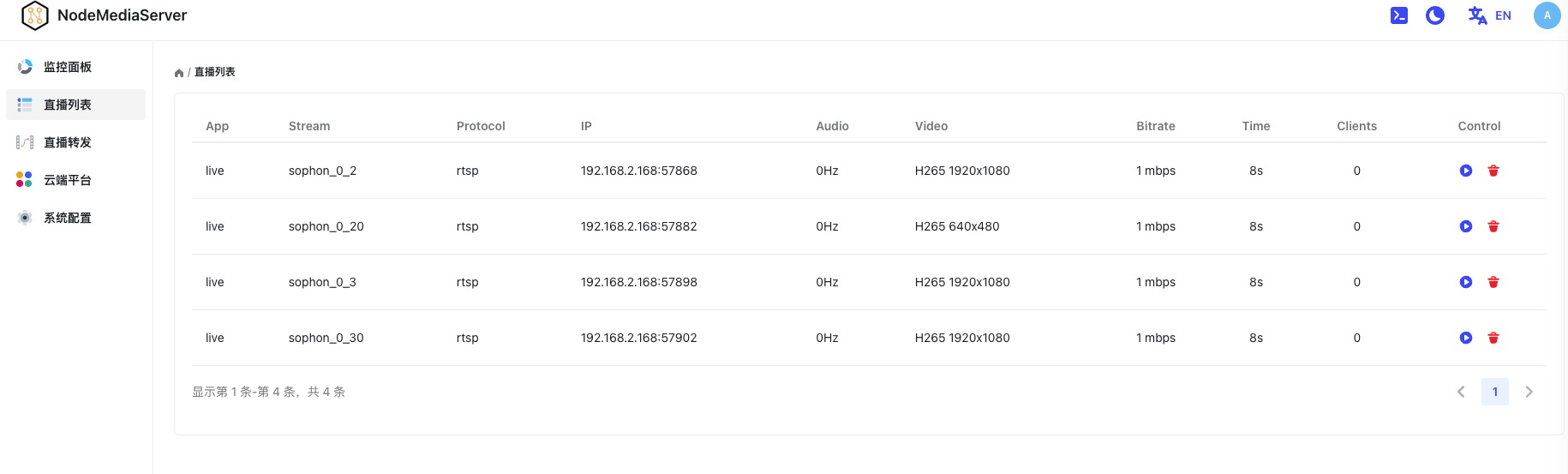 
嘿,我是小R,需要帮助随时找我哦
QQ客服:281269007
飞书客服
邮件支持
扫码加微信
回到顶部